How We Stopped One Splunk Forwarder From Taking All the Traffic
Use of HAProxy, keepalived, and rsyslog to ensure even distribution of both syslog and HEC traffic on three Splunk Heavy Forwarders and how we managed to overcome TCP connection stickiness and absence of the source IP.


Why We Started
This time it was all done by us together, both Öykü Can and Tahsin Güner, from our very first failure up until our last configuration change.
None of this would have happened without Yunus Orpak, though - he took on our other work while we chased this down, and that’s what actually gave us the room to get it right.
We were using two Splunk Heavy Forwarders receiving syslog and HEC data but without any sort of load balancing between them, sources were choosing a specific HF and staying with that choice. Sometimes one of those HFs would be overloaded, whereas the other one would not have any work to do, until it became too much for the overloaded HF.
Why We Went With HAProxy and Why It Was Not Just Install and Configure
Everything about the solution seemed straightforward: use HAProxy as the load balancer to distribute the requests evenly. And so, we did – only to quickly find out that the default configuration was insufficient. While the default configuration allowed for connections to be made and distributed successfully by HAProxy, it simply was not doing what we needed it to do.
What We Actually Built
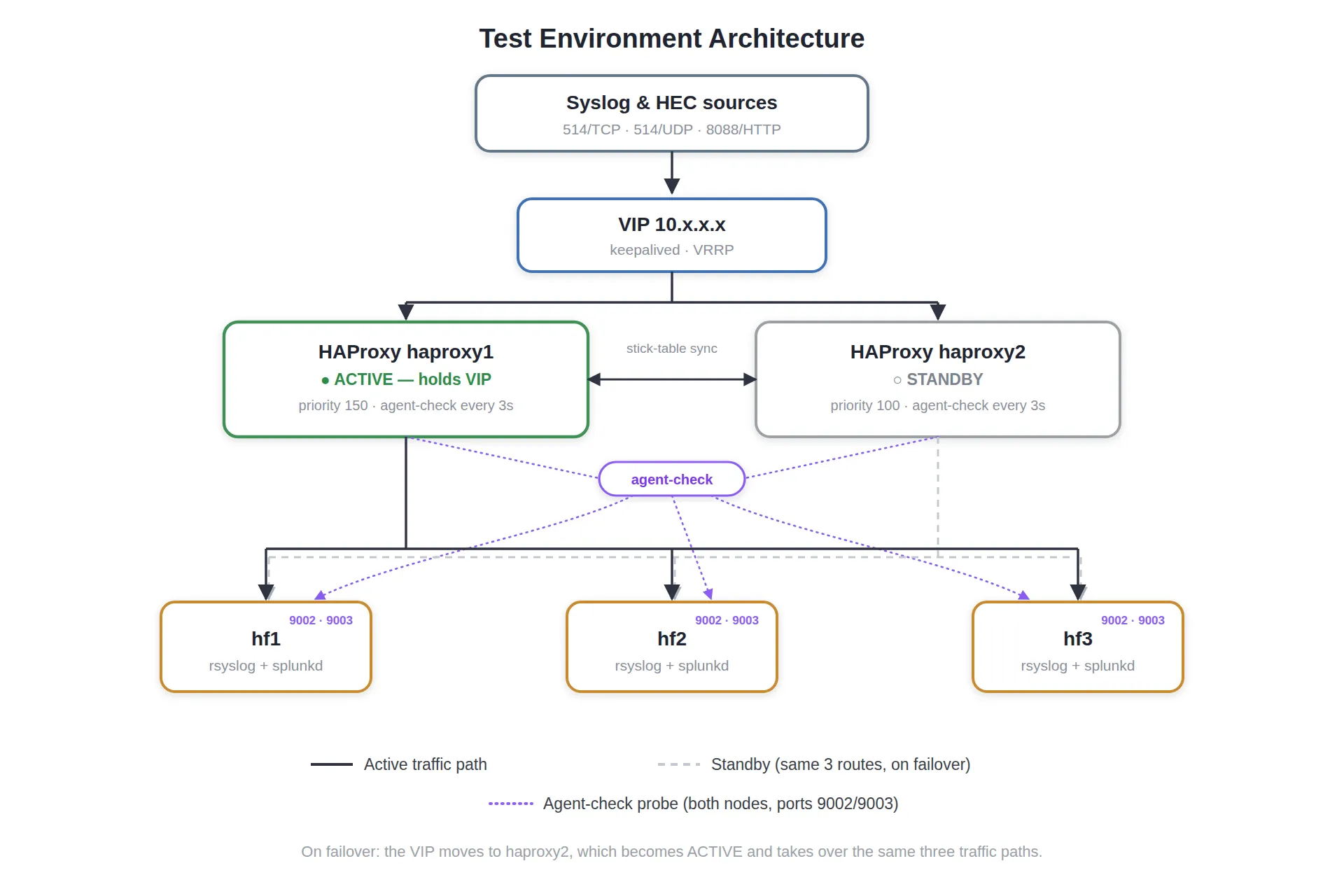
Health checking
There was no point in HAProxy trusting a backend based on its acceptance of connections; we needed the load balancer to know if syslog or HEC was individually healthy in the HF. The problem with having a single health check was that an error in one of the services on a particular HF could bring down the whole health check for the other service, despite the latter still being up and running.
backend syslog_udp_pool
    mode log
    balance roundrobin
    option log-health-checks
    server hf1 x.x.x.x:514 check inter 3s fall 3 rise 2 weight 100 agent-check agent-port 9002 agent-inter 5s
    server hf2 x.x.x.x:514 check inter 3s fall 3 rise 2 weight 100 agent-check agent-port 9002 agent-inter 5s
server hf3 x.x.x.x:514 check inter 3s fall 3 rise 2 weight 100 agent-check agent-port 9002 agent-inter 5sserver hf1 x.x.x.x:8088 check inter 3s fall 3 rise 2 weight 100 agent-check agent-port 9003 agent-inter 5s
server hf2 x.x.x.x:8088 check inter 3s fall 3 rise 2 weight 100 agent-check agent-port 9003 agent-inter 5s
server hf3 x.x.x.x:8088 check inter 3s fall 3 rise 2 weight 100 agent-check agent-port 9003 agent-inter 5sActually distributing the load
HEC uses HTTP, therefore we ran HEC in mode http that distributes the load on a per-request basis – the most logical way to distribute the load.
frontend splunk_hec_in
    bind *:8088
    mode http
    option httplog
    default_backend splunk_hec_pool
Syslog UDP uses a log-forward construct instead of a generic frontend/backend — HAProxy analyzes the syslog record and forwards it message-by-message with balance roundrobin choosing a new HF for each and every line.
Syslog TCP originally worked different, and it got us into trouble. First attempt ran it as a regular mode tcp frontend/backend — an ordinary byte proxy with no notion that it deals with syslog. This is connection-based balancing — once an incoming connection is routed to an HF, it will stick to that one as long as the connection exists. Usually good, but it meant that one persistent sender could always park its traffic to one particular HF forever, and it also left us with no way to tag a true source IP to our message like we did on UDP side (more on this below).
Solution was to treat TCP syslog not as “just a stream” and run it through the same log-forward construct as UDP - but provided by bind instead of dgram-bind. With HAProxy analyzing the syslog messages, we can now also balance per message here. We even tested this directly by maintaining one TCP connection without any reconnection for the entire duration of the test and found that it distributed its packets equally among the three HFs as well. This is definitely solving the issue at hand with regards to connection stickiness.
log-forward syslog_tcp_in
    bind *:514
    maxconn 20000
    timeout client 1m
    option host append
    log backend@syslog_tcp_pool len 65535 format rfc5424 local0

backend syslog_tcp_pool
    mode log
    balance roundrobin
    option log-health-checks
    # fastinter/observe/error-limit: HAProxy has a known rough edge
    # where a log-forward TCP backend connection isn't always
    # recreated cleanly if it drops mid-stream. These make agent-check
    # + live-traffic observation catch a stuck backend faster, as a
    # safety net rather than a real fix.
    server hf1 x.x.x.x:514 check inter 3s fastinter 500ms fall 3 rise 2 weight 100 observe layer4 error-limit 2 agent-check agent-port 9002 agent-inter 5s
    server hf2 x.x.x.x:514 check inter 3s fastinter 500ms fall 3 rise 2 weight 100 observe layer4 error-limit 2 agent-check agent-port 9002 agent-inter 5s
server hf3 x.x.x.x:514 check inter 3s fastinter 500ms fall 3 rise 2 weight 100 observe layer4 error-limit 2 agent-check agent-port 9002 agent-inter 5sGetting the real client IP into every log line
For being able to split the logs by the sources using directories further down the stream, it is important to identify who was actually sending these messages, as HAProxy sees not always what the correct IP should be inserted in the logs. And that is why the option option host append comes into play, where HAProxy rewrites the syslog HOSTNAME field to original_host,real_client_ip.
template (name="splunk_template" type="string"
  string="/data/log/splunk/syslog/%$!splunk_ip%/%$MYHOSTNAME%-%$YEAR%-%$MONTH%-%$DAY%-%$HOUR%-%$QHOUR%.log")

template (name="splunk_message_template" type="string"
  string="%syslogtag%[src_ip=%$!splunk_ip%] %msg%\n")

# HAProxy's "option host append" (both log-forward sections) turns the
# syslog HOSTNAME field into "original_host,real_client_ip". Field 44
# is a comma - split on it to pull the real IP back out on this side.
set $!splunk_host = field($hostname, 44, 1);
set $!splunk_ip   = field($hostname, 44, 2);
On the HF side, rsyslog just splits that field back apart on the comma to recover the IP and key its output directory on it.
keepalived and VIP
Since our source IPs can only ever point to one destination IP address, we use keepalived to sit before both of our HAProxy nodes with a VIP and failover. We have a health check script that checks whether HAProxy itself is up and listening.
vrrp_script chk_haproxy {
    script "/usr/local/bin/check_haproxy.sh"
    interval 2
    timeout 1
    fall 2
    rise 2
}#!/bin/bash
#
# Health check for keepalived's vrrp_script (see keepalived.conf).
# Exit 0 = healthy. Exit 1 = failed; after two consecutive failures
# keepalived moves the VIP to the other node.
#
# Only checks that HAProxy itself is alive and accepting traffic -
# not backend/HF health. If every HF is down, both nodes fail this
# identically, which is correct: there's no healthy node to hand
# the VIP to anyway.
LOG_TAG="check_haproxy"
fail() {
logger -t "$LOG_TAG" "FAIL: $1"
exit 1
}
# Is the service actually running?
systemctl is-active --quiet haproxy || fail "haproxy service not active"
# Are the critical ports really owned by haproxy - not just open?
# (Guards against a crashed process leaving a stale/zombie socket.)
LISTENING=$(ss -tulnp 2>/dev/null)
for p in 514 8088; do
echo "$LISTENING" | grep -E "[:.]$p[[:space:]]" | grep -q "haproxy" \
|| fail "port $p not held by haproxy"
done
# Is the runtime socket responsive, and actually HAProxy's?
# (Guards against a hung/deadlocked process behind an empty
# or bogus response.)
INFO=$(echo "show info" | timeout 0.5 socat -t 0.3 stdio /run/haproxy/admin.sock 2>/dev/null)
[ -n "$INFO" ] || fail "runtime socket empty/unresponsive"
echo "$INFO" | grep -q "^Name: HAProxy" || fail "runtime socket returned unexpected response"
exit 0In addition, we have an additional “notify_master” hook which closes all hanging connections right away after the takeover of the VIP by a node - a cleanup procedure related to the HAProxy-node failover process but no longer responsible for the routine TCP balancing task (that’s done by log-forward now).
# Runs once, the moment this node takes over the VIP: force-closes
# any sessions left over from the previously active node, so
# clients reconnect cleanly onto whichever node is active now.
notify_master "/usr/local/bin/haproxy_rebalance.sh"
rsyslog
At high volumes of traffic, HAProxy’s logging itself became so heavy that it broke through rate limiting performed by journald. We used a separate log relay instead, all going into one rotated file, with HAProxy itself assigning severity based on the response, meaning every line gets a proper severity designation without any parsing by rsyslog.
# /etc/rsyslog.d/49-haproxy.conf
module(load="imudp")

# Send remaining HAProxy messages to a dedicated logfile
:programname, startswith, "haproxy" {
  /var/log/haproxy.log
  stop
}$ ls -la /var/log/haproxy.log
-rw-r----- 1 syslog adm haproxy.logPorts and servers
| Port / protocol | Between | Purpose |
|---|---|---|
| 514/TCP | clients → VIP → HF | syslog (TCP) |
| 514/UDP | clients → VIP → HF | syslog (UDP) |
| 8088/TCP (HTTP) | clients → VIP → HF | Splunk HEC |
| 9002/TCP | HAProxy → HF | agent-check: syslog health only |
| 9003/TCP | HAProxy → HF | agent-check: HEC health only |
| 1024/TCP | HAProxy ↔ HAProxy | peers stick-table sync |
| VRRP (IP protocol 112) | HAProxy ↔ HAProxy | keepalived heartbeat |
| 8404/TCP | loopback only | HAProxy stats page |
As far as the server is concerned, this included two HAProxy servers that share the VIP, and went from two HFs to three.
A few small tricks to steal
It was actually a few small things that made the real difference, easily overlooked while scanning the configuration files above:
- The relocation of TCP syslog from regular
mode tcpfrontend/backend intolog-forward– the same hack that was done for UDP, but now solving two issues simultaneously: connection stickiness and source IP. option host append– the real source IP is appended directly to the message payload of the syslog stream, both paths being affected since they uselog-forward.http-response set-log-level– HAProxy determines the log level based on response codes on the source side; no one down the pipeline needs to determine that from plain text.- Two ports for a single health check (9002 for syslog path and 9003 for HEC), not a single script – the simplest way to solve “an unrelated failure marks a healthy service down too.”
- keepalived’s
notify_masterlifecycle hook executing the one-time cleanup script – utilizing the lifecycle event that is available for free to kick any stale connections off the node upon leaving the master state.
Taking It for a Spin
With all the setup done, here is what we tried it out on, not the prettiest tests you might have seen:
- Stopped rsyslog on one HF - traffic continued to flow through the other two nodes without any problems.
- Stopped HEC on one HF - again, the same, traffic shifted to two nodes which were still operational flawlessly.
- Stopped keepalived on the active HAProxy node - VIP transferred perfectly well, control passed to the second node seamlessly.
- Stopped HAProxy itself on the active node - again, the same, traffic continued flowing.
Nothing dramatic to report, which was exactly the point.
$ nc hf3 9002
100% up ready # cpu=12 mem=34

$ nc hf3 9003
0% down # hec_8088_unhealthy
We conducted separate load balancing tests on a live and working environment with a specific number of test messages being sent for each protocol, while noting the exact number that reached each HF (HEC count verified through Splunk directly, and the others from each HF log):
| Test | Sent | hf1 | hf2 | hf3 |
|---|---|---|---|---|
| UDP, continuous | 1841 | 612 | 611 | 612 |
| TCP, single connection | 3134 | 1042 | 1042 | 1041 |
| TCP, 30 separate connections × 100 | 3000 | 1000 | 1000 | 1000 |
| HEC, 30 sessions × 100 | 3000 | 1000 | 1000 | 1000 |
The 30-session TCP and HEC trials ran exactly even with no loss. It’s the single-session TCP trial that’s the key one to pay attention to: one session, no reconnects for the whole trial, and it still managed to be about perfectly distributed across all three HFs, directly verifying that shifting TCP syslog into log-forward was what solved the problem of TCP stickiness, not only IP source stickiness. The small discrepancies between “sent” and each HF total for the UDP and single-session trials (6 and 9 messages respectively) appear to be the result of timing in counting and not actually messages lost, since both 30-session trials (which we could count clean at the session level) ran exactly even.
Raw output from all four test runs
============================================
 UDP TEST STOPPED
============================================
 Test ID      : HAPROXY_LB_TEST
 Total sent   : 1841
 Last seq     : 1841
 Reconnects   : 0
 Duration     : 37.09 sec
 Average EPS  : 49.64
============================================

HF1 :  612 total
HF2 : 611 total
HF3 : 612 total============================================
TCP Single Connection TEST STOPPED
============================================
Test ID : HAPROXY_LB_TEST
Total sent : 3134
Last seq : 3134
Reconnects : 0
Duration : 63.17 sec
Average EPS : 49.61
============================================
HF1 : 1042 total
HF2 : 1042 total
HF3 : 1041 total============================================
TCP Multi Connection TEST STOPPED
============================================
Test ID : HAPROXY_LB_TEST
Sessions opened : 30
Total sent : 3000
Last seq : 3000
Reconnects : 0
Duration : 30.46 sec
Average EPS : 98.48
============================================
HF1 : 1000 total
HF2 : 1000 total
HF3 : 1000 total============================================
HEC Multi TEST STOPPED
============================================
Test ID : HEC_BASELINE01
Sessions opened : 30
Total sent : 3000
Total failed : 0
Last seq : 3000
Reconnects : 0
Duration : 33.39 sec
Average EPS : 89.85
============================================
HF1 : 1000 total
HF2 : 1000 total
HF3 : 1000 totalConclusion
The load is distributed to all three HFs even for one TCP connection with a long life cycle, rather than only when there are many short TCP connections. Queue formation on each HF due to imbalance, that used to happen any time one HF had more packets than it should have, has improved quite a bit.
What we could try next
We could purposely restart the rsyslog of an HF in the middle of the test with TCP traffic happening, in order to see if HAProxy’s log-forward TCP backend is able to reconnect or gets stuck - a known issue upstream (as indicated in the callout “Actually distributing the load”) that we have not deliberately triggered yet.
In case you’ve encountered a similar situation with the syslog/HEC load balancing, or you simply want to criticize us, we would really love to hear from you. Reach out to us!!! We would love to hear you! 🌸
Öykü on LinkedIn, Tahsin on LinkedIn.
Credits
- Written by
- Öykü Can, Tahsin Güner
- Code
- Öykü Can, Tahsin Güner
- Review
- Öykü Can, Tahsin Güner
- With support from
- Yunus Orpak